Appearance
Repository
For the package to work properly with GitLab, the settings described here must be made.
WARNING
Please make absolutely sure that all settings are set as described, otherwise errors may occur.
Structure
Branches
The branches within a project must have the following structure:
| Branch name | Description |
|---|---|
development | The main branch, which contains the latest (unstable) version of the current development. All new features will be merged here. |
staging | If necessary, the staging branch can be used to publish pre-releases (e.g. 1.5.0-rc.1...1.5.0-rc.x) for further testing/QA.\ Note: This branch is optional and not needed for running the package |
release | Contains the latest published release. Changes should always be merged by a merge request either from staging (if used otherwise development) or hotfix branches. |
See Gitlab / Repository for details of branches setup.
Filesystem
The project should follow the following basic format:
node_modules/           # Installed NPM packages must not be pushed to repository
.gitignore              # Ignore files from git repository
.npmrc                  # Settings for NPM to use private Lade package registry
package.json            # Version reference of used NPM package dependencies
release.config.js # Config file for semantic-releaseThe minimum content of .gitignore should contain:
node_modules

# Editor directories and files
.idea
.vscodeContent of .npmrc:
@lade-software-library:registry = "https://gitlab.dev.lade.de/api/v4/packages/npm/"
node-linker=hoistedGitlab
Variables
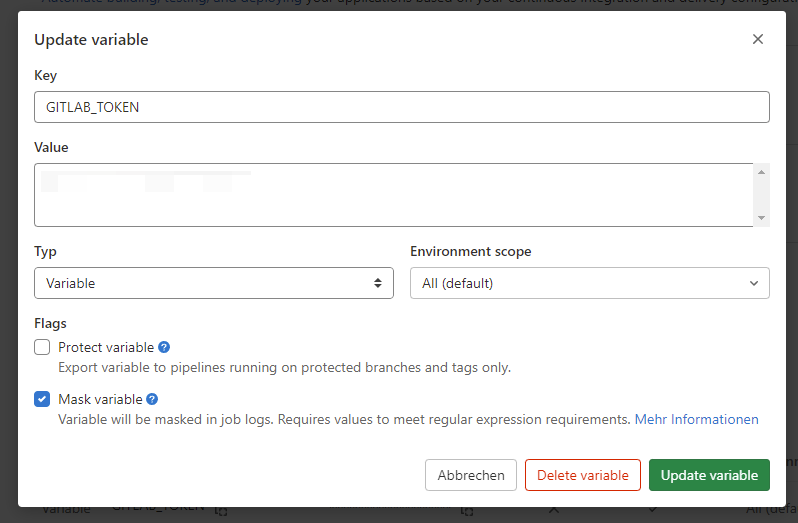
Set deployment token
In order for the package to set tags in the repository, an environment variable must be set in the project that contains an access token.
For this we use a generic token, which can be found in Bitwarden under Software | GitLab Pipeline User - Deployment / API Token and set it up as follows:
- Select the item
CI/CDunderSettings - Open the item
Variables - Add a variable with the name
GITLAB_TOKEN - Make sure that all settings are set as shown in the picture:
- Type:
Variable - Mask variable:
Checked
- Type:
Members
Add pipeline user
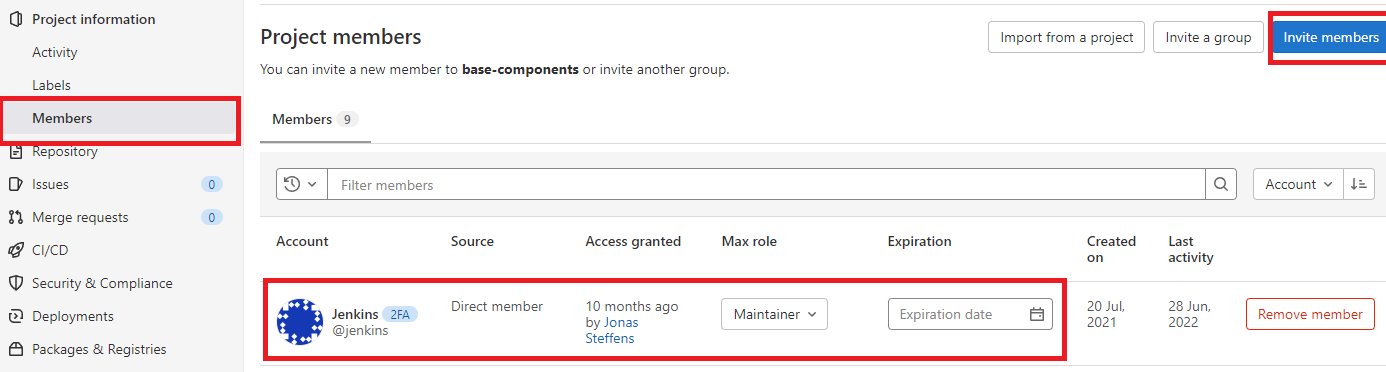
For the token from Variables: Set deployment token to work, the owner of the token, the user LADE Development, must also be added to the project as a developer. This happens as follows:
- Go to the repository in
Gitlab->Members - Add the
GitLab Pipeline User - Deploymentuser withDeveloperrole to the repository.
General
Merge-Requests settings
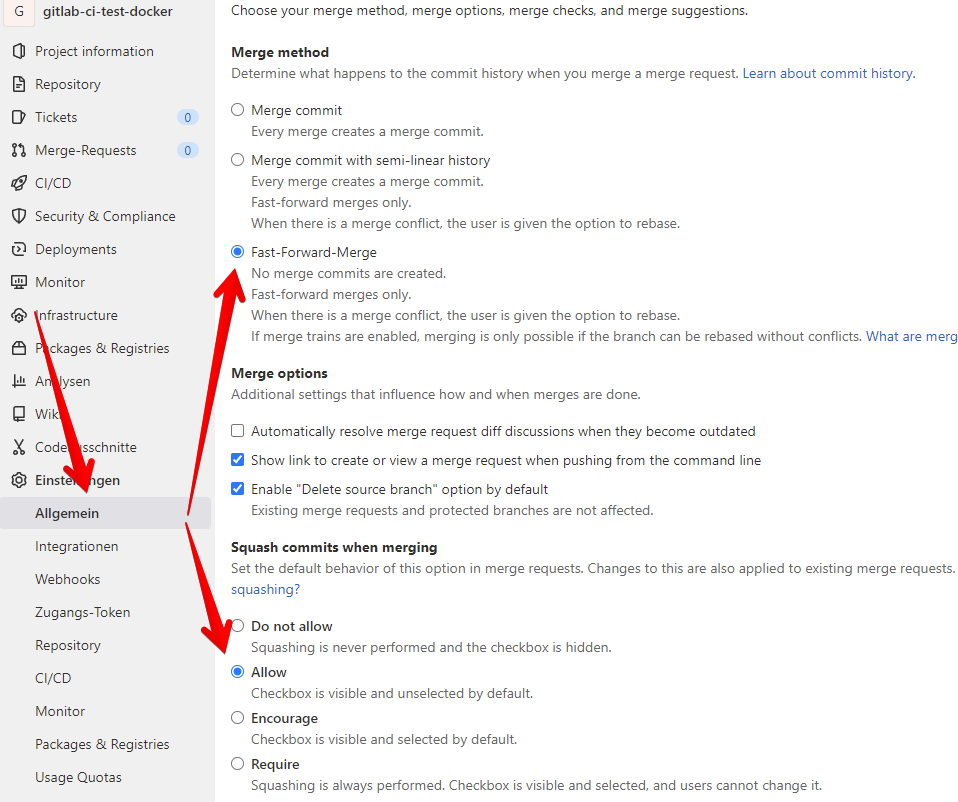
For the package to function properly, settings for merging and committing must be adjusted as follows:
- Go to the repository in
Gitlab->Settings->General - Under
Merge Requestsselect:Fast-forward mergeforMerge methodAllowforSquash commits when merging.
These settings will avoid the overhead of merge commits.
Repository
Set up branches
As described under Branches, we work with a fixed branch concept.
To create the branches staging and release you can click on the button New Branch under Repository -> Branches.
With staging branch
If you are working with a staging branch, proceed as follows:
Staging
- Click the
New Branchbutton - Enter the value
staginginBranch name. - Select the repository
developmentinCreate from.
Release
- Click the
New Branchbutton - Enter the value
releaseforBranch name. - Select the repository
staginginCreate from.
Without staging branch
If you are working without a staging branch, proceed as follows:
Release
- Click the
New Branchbutton - Enter the value
releaseinBranch name. - Select the repository
developmentinCreate from.
Set branch protection
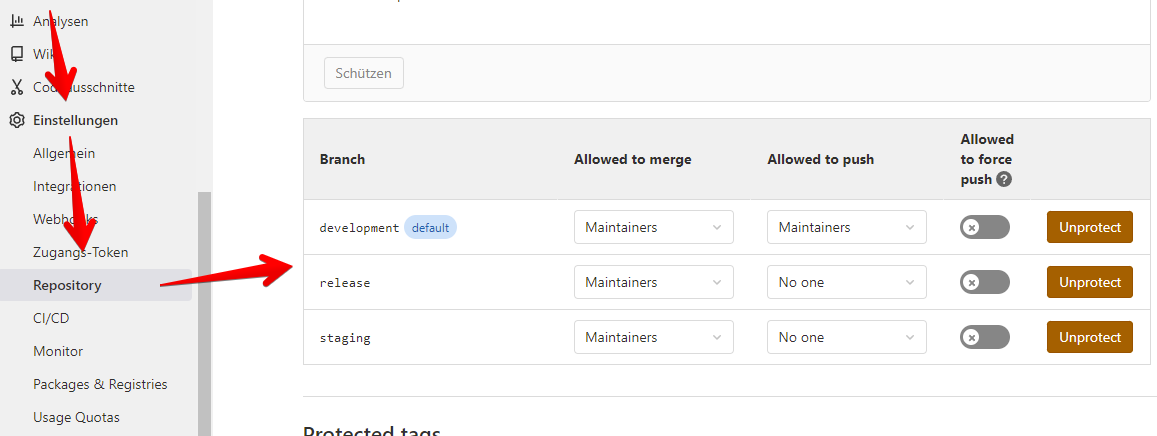
For the correct functioning of the workflows, it is important that the right branches are protected from being deleted or people without rights changing code.
- Go to the repository in
Gitlab->Settings->Repository - Under
Protected branchesadd following settings:development- Allow to merge =
Maintainers - Allowed to push =
Maintainers
- Allow to merge =
staging- Allow to merge =
Maintainers - Allowed to push =
No one
- Allow to merge =
release- Allow to merge =
Maintainers - Allowed to push =
No one
- Allow to merge =
Setup service-side git hooks
WARNING
This has to be done by a server admin
To check the commit messages on the server before pushing or accepting a merge request, you need to copy the git server hooks fromnode_modules/@lade-software-library/semantic-release/git-server-hooks to <gitlab-directory>/data/git-data/repositories/<repository>/custom_hooks/, make the scripts executable and set the owner to the gitlab user.
In our gitlab directory there is a script copy-custom-hooks.sh which will copy the custom server hooks from the custom_hooks directory to every specified repository. Extend the script with your repository to receive updates of the server hooks.
Our repositories are stored by with a hashed storage
More information about Gitlab server hooks.